![0224_Surepact_Logo-Primary-1.png]](https://support.surepact.com/hs-fs/hubfs/0224_Surepact_Logo-Primary-1.png?height=43&name=0224_Surepact_Logo-Primary-1.png)
Note: This screen is visible only when the Funding Program is setup with Enable external Assessors for review?
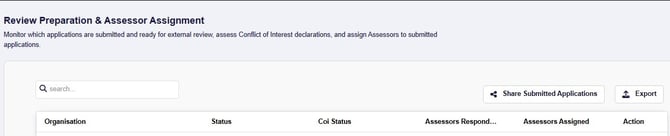
As application submissions are received (or Eligibility Check has been completed), the Review Preparation & Assessor Assignment screen table will update with those submissions. Once the Application Close Date has passed and the final list of application submissions are visible in the table, the submissions can be shared with External Assessors for a Conflict of Interest review.
Important: As a Funding Body employing external assessors to review your received application submissions, you must ensure that you have updated your External Assessors list so that active and supportive Assessors can be chosen to participate in the review process.
Request Conflict of Interest review
Once all application submissions are received, select Share Submitted Applications.

In the new window, select each Assessor you want to review the submissions for Conflict of Interest, then select Confirm & Share Applications.
{screenshot}
On confirmation, the selected Assessors will be notified of the pending Conflict of Interest reviews waiting for their action, and once they complete their reviews, the table will update:
-
CoI Status column will display No Conflict / Conflict
-
Assessors Responded value will increase

Review Conflict of Interest
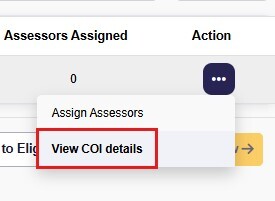
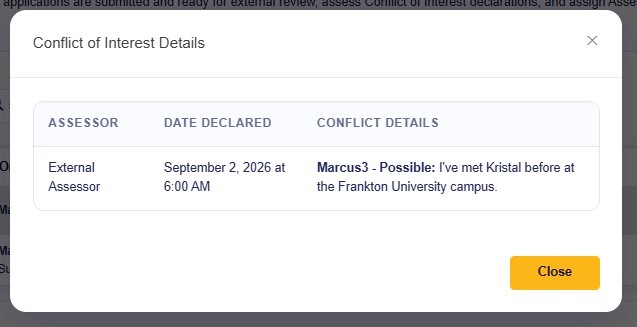
If all Assessors have responded, you will be able to view the details of application submissions that have a declared Conflict of Interest with (at least one) of the Assessor group - select the Actions button and View COI Details option.
For any declarations with Actual Conflict of Interest, Assessors are automatically excluded from being assigned to review that particular submission. For any Perceived or Possible Conflict of Interest declarations, these are not excluded from being assigned to review the submission - it is at the Funding Body's discretion as to whether the declaration warrants excluding the Assessor from reviewing applications.
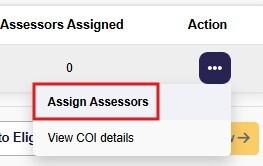
Assign Assessors
With Conflict of Interest declarations obtained, the Assessors can be assigned to applications to review. Select the Actions button and Assign Assessors option.
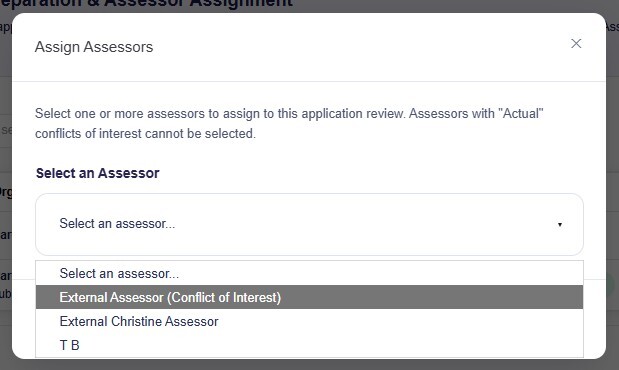
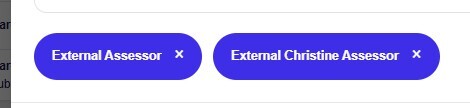
In the new window, select Assessors from the list and they will display in the window.
If you want to remove a selected Assessor, select the x on the Assessors name.
Note: Assessors will indicate their Conflict of Interest level, if declared, and this impacts how they are displayed in the Select an Assessor list.
"Actual" Conflict of Interest will be identified alongside the Assessor name and being disabled for review assignment selection.
"Possible" and "Perceived" Conflict of Interest will be identified and enabled for review assignment - it is at the discretion of the Funding Body to determine if the Conflict of Interest may produce bias in assessment of an application submission.
When you're ready to confirm assignment of the selected Assessors, select Assign [x] Assessors (where [x] is the number of selected assessors).
The Review Preparation table updates to reflect the number of Assessors assigned to each submission to review.

Once an Assessor has completed a review, this will update in the Review step and table.