![0224_Surepact_Logo-Primary-1.png]](https://support.surepact.com/hs-fs/hubfs/0224_Surepact_Logo-Primary-1.png?height=43&name=0224_Surepact_Logo-Primary-1.png)
When agreed (or appropriate), Funding Bodies can disburse funds to Recipients in the Deliverables and Disbursements stage. The process requires the Program Manager to create the request for disbursement, and the Finance permission-enabled Member to complete the payment record.
Create disbursement
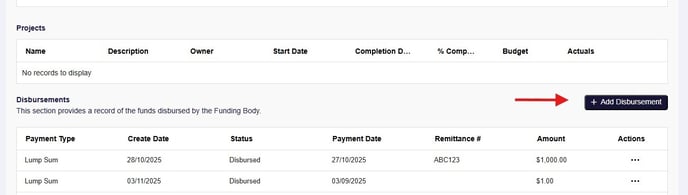
To create a disbursement, select the Recipient to view in Deliverables and Disbursements, and select + Add Disbursement.
Enter the Payment Type and the Disbursement Amount, then select Submit to Finance.
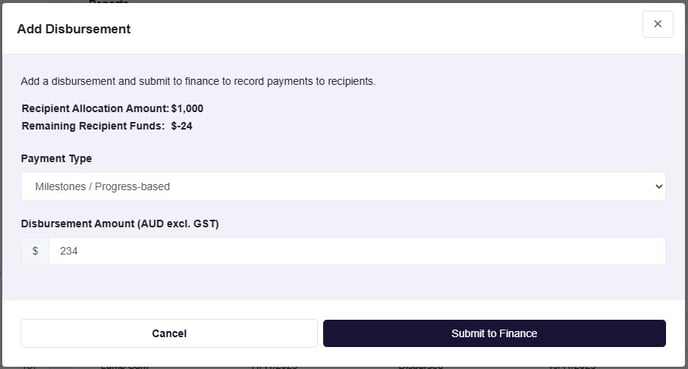
The Finance Member will receive a notification of the disbursement awaiting their input.
Disburse funds
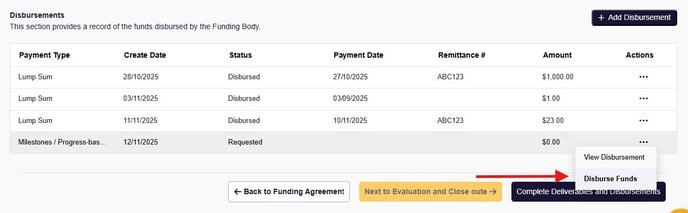
When the Finance Member views the Recipient in Deliverables and Disbursements, and they select the Disburse Funds option from the Actions list -
- the Payment Date, Remittance #, and Amount Paid fields are available to complete.
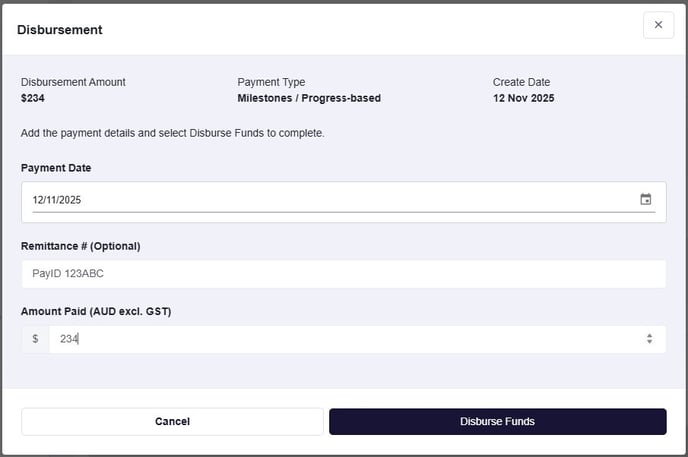
On selection of Disburse Funds button, the disbursement is complete and the Recipient is able to view the disbursement in their application's Reporting stage.