![0224_Surepact_Logo-Primary-1.png]](https://support.surepact.com/hs-fs/hubfs/0224_Surepact_Logo-Primary-1.png?height=43&name=0224_Surepact_Logo-Primary-1.png)
After the Funding Body has reviewed all declared 😍Conflicts of Interest, they will proceed to assigning Assessors to applications to review.
Once assignment is complete, Assessors will receive a notification email from SurePact advising of this and to login and commence reviews.
Assessors can view their assigned applications in the Application Review screen.

Here, Assessors select Review from the Actions options and view the application content and the review criteria.
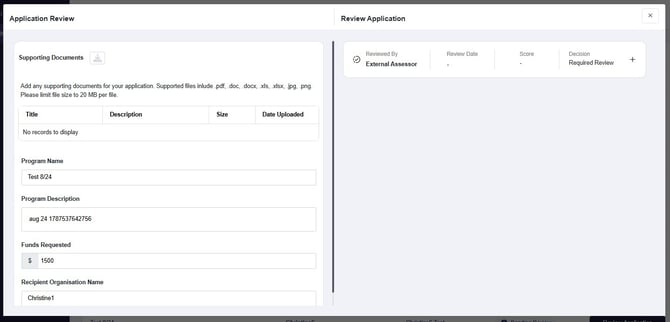
To review an application:
-
View the content of the application submission and cite any files added to the Supporting Documents section
-
Expand the review accordion by selecting "+", then read and assess the application content against each review criterion, adding any Comments and Scores as you progress
-
Note: SurePact will save your progress automatically, so you can pick up from where you left.
-
-
Enter any final/overview Comments
-
Select an endorsement decision (Yes or No)
Once an endorsement is confirmed, the application review is considered complete and the status in the table will reflect this.

The completed review is also shared with the Funding Body to support their final decisions for funding awards. Once all reviews have been complete, this will conclude the External Assessor's contribution to application reviews.