![0224_Surepact_Logo-Primary-1.png]](https://support.surepact.com/hs-fs/hubfs/0224_Surepact_Logo-Primary-1.png?height=43&name=0224_Surepact_Logo-Primary-1.png)
Once Funding Agreements have been accepted by Recipients, the Deliverables and Disbursements stage unlocks. Here, Funding Bodies can track the progress of Recipient reporting and projects, as well as create and complete disbursement records where payments have been made to Recipients.
The stage becomes available to users once a single Funding Agreement has been accepted by a Recipient. As more Recipients accept agreements, the list view builds.
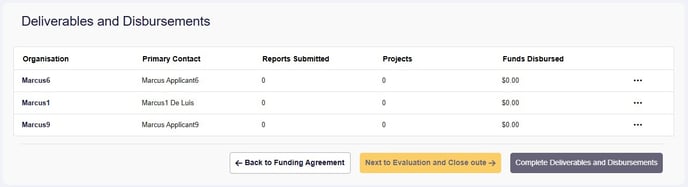
The list view shows:
- The number of reports submitted by a Recipient
- The number of projects submitted by a Recipient
- The total amount of disbursements the Funding Body has processed for a Recipient
Viewing Recipient deliverables
To view a Recipient's reporting, select Actions (...) > View (or double-click the row).
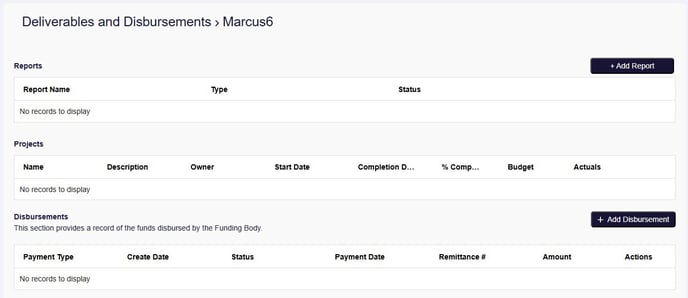
The Recipient view details the reports, projects and disbursements created or submitted. In this screen, you can:
- Create reports for the Recipients to action and submit
- View reports submitted by the Recipient
- View projects submitted by the Recipient
- Create disbursements for Finance (member role) to action
Completing Deliverables and Disbursements stage
When Recipients have submitted all reports and projects to the Funding Body, and the Funding Body has completed all disbursements to Recipients, the stage can be considered complete. SurePact allows the stage to be completed when the Funding Body is ready, though some thought needs to be given to the right time to complete the stage as some functions will be locked.
To complete the Deliverables and Disbursements stage, select Complete Deliverables and Disbursements.
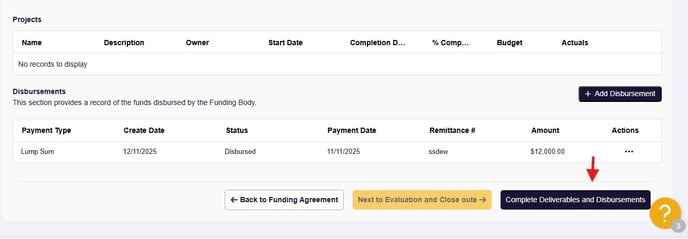
A window will display asking if you are ready to complete the stage -

Confirming the challenge will complete the stage and unlock the Evaluation and Closeout stage. Even with the stage complete, Recipient reports can continue to be processed.
The next stage unlocked is Evaluation and Closeout.